The Problem
Dental clinics and other local service businesses spend money acquiring leads through paid ads, website forms, funnels, phone inquiries, and previous consultations. A large portion of those prospects never convert immediately.
Some stop responding. Others delay because of price or timing, miss a consultation, compare providers, or simply never schedule. Over time, those leads accumulate inside the CRM even though the business has already paid to acquire them.
The problem is not solved by simply sending another follow-up email. A useful reactivation system needs to determine who is actually safe to contact, personalize outreach using existing context, understand replies, respect opt-outs, escalate sensitive questions, keep CRM stages accurate, and move genuine booking intent toward a real appointment.
For a dental implant clinic, this creates a way to recover value from already-acquired leads instead of relying entirely on additional advertising spend.
The same pattern is relevant to other high-consideration local and service businesses such as healthcare clinics, med spas, home services, legal services, real estate, and similar businesses with dormant CRM databases.
The core idea is simple:
Turn an inactive lead database into a controlled reactivation pipeline without giving AI control over business-critical decisions.
GoHighLevel — CRM & Operations Layer
GoHighLevel is the operational source of truth for contacts, opportunity stages, opt-out state, staff ownership, and appointment status.
The project uses a dedicated Dental Implant Reactivation pipeline with six meaningful stages:
- Reactivation Ready
- Contacted
- Interested
- Consultation Booked
- Not Interested
- Human Follow-up
Technical events such as "email generated" or "reply received" were intentionally not added as separate pipeline stages.
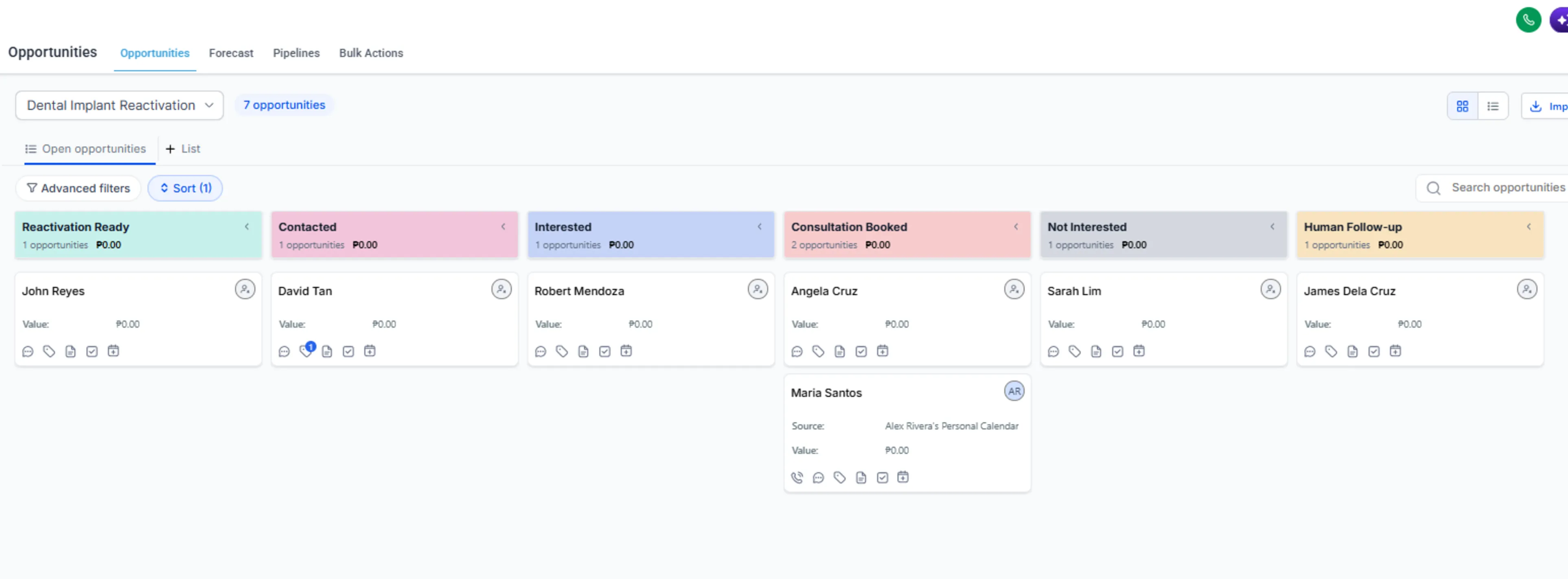
The GHL pipeline keeps the reactivation process focused on six meaningful business states instead of turning every technical event into a separate CRM stage.
A single trigger tag starts the outbound automation:
implant-reactivation-ready
The CRM stores only the lead context required by the automation:
- Original Inquiry Date
- Previous Outcome
- Previous Objection
- Previous Notes / Context
- Last Reactivation Email
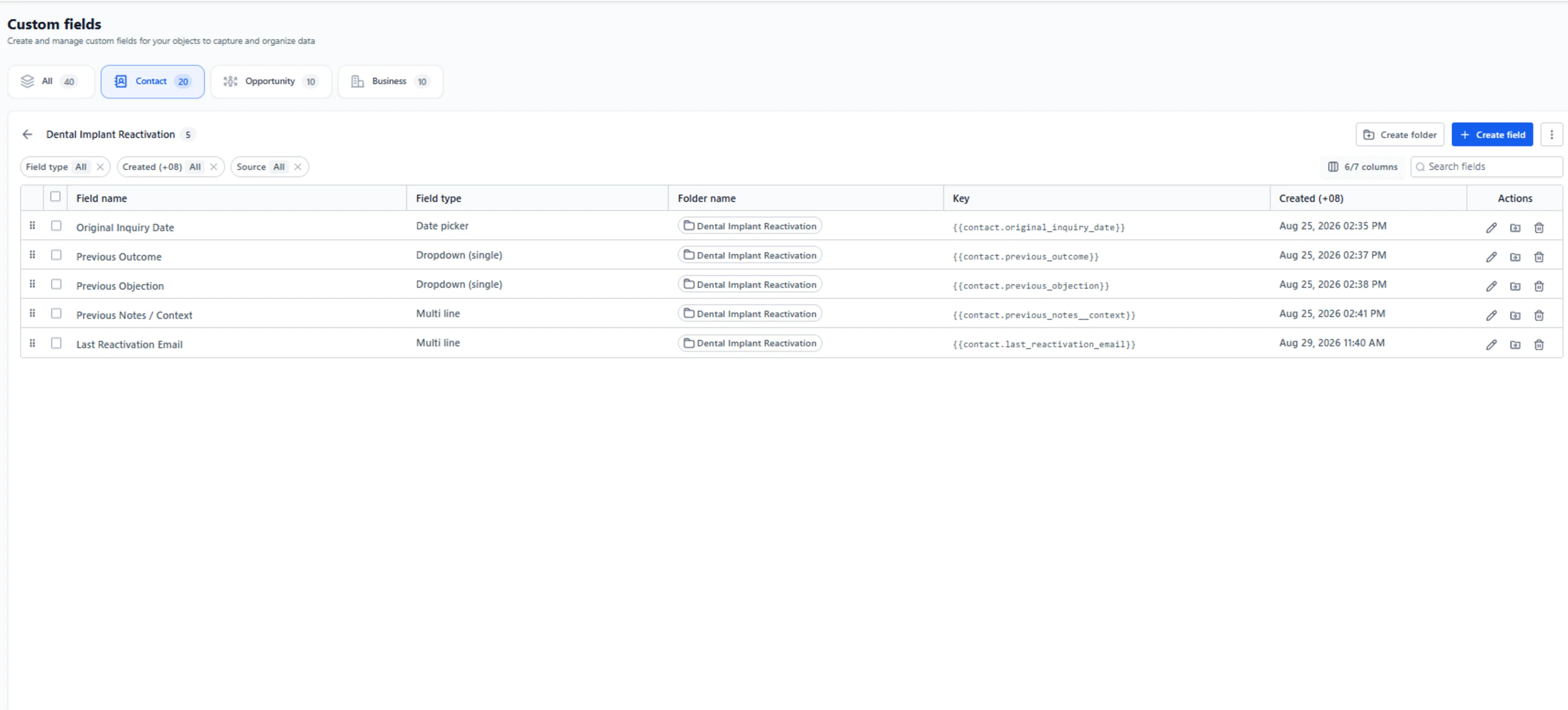
These contact fields preserve the historical lead context used for eligibility, personalization, and reply classification without introducing a separate database.
Native GHL Email DND remains the authoritative unsubscribe state. Contacts with email DND, missing email addresses, already-booked outcomes, or converted outcomes are stopped before AI generation or outreach.
A dedicated Dental Implant Reactivation Representative / Treatment Coordinator role handles cases that should not be automated. The role is limited to:
- Contacts
- Opportunities
- Calendars
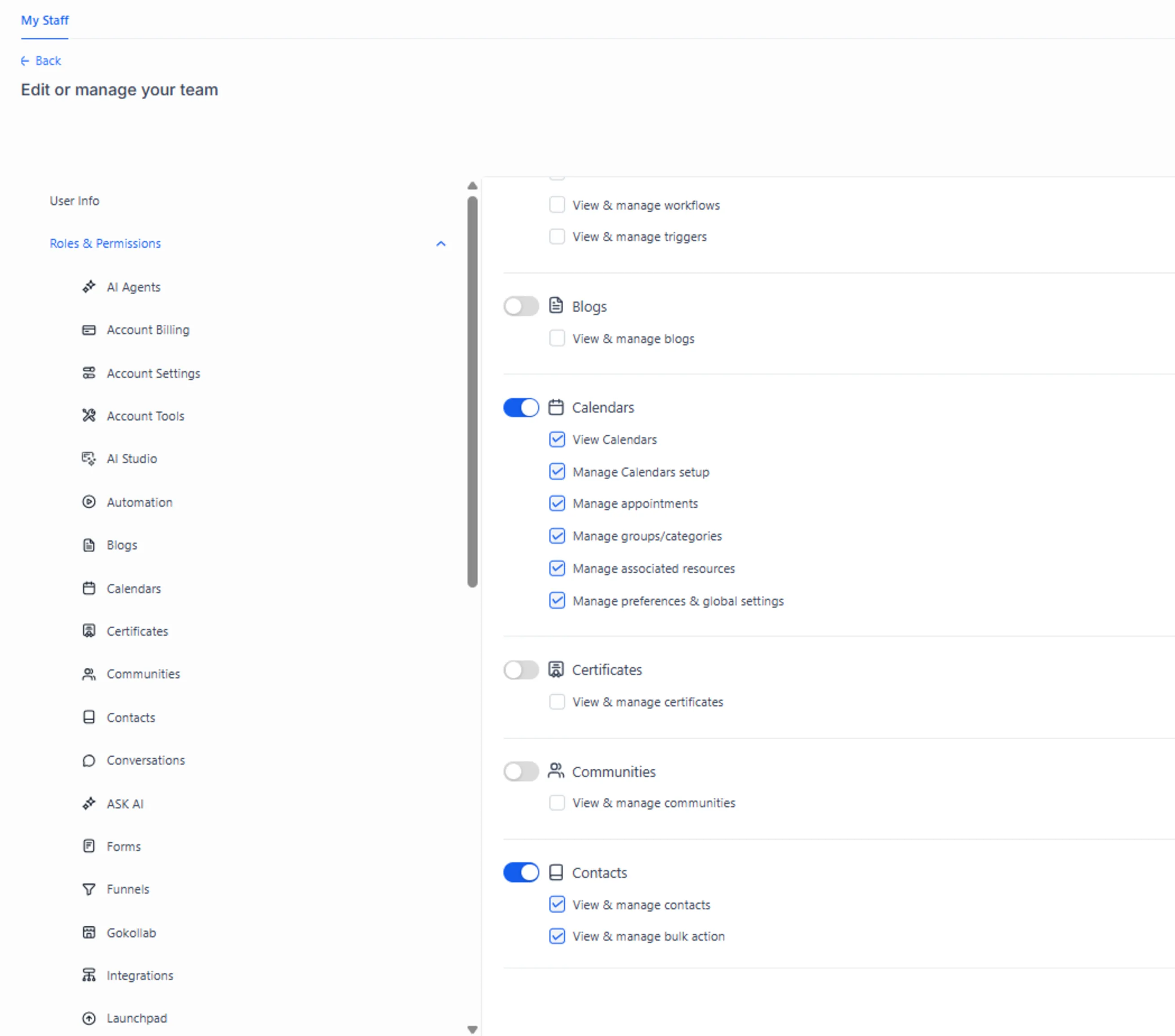
The Treatment Coordinator role is deliberately restricted to the CRM areas needed for human follow-up, opportunity management, and consultation scheduling.
Questions, human requests, clinical questions, and uncertain replies are routed to this role with the latest reply stored as CRM context.
For consultation booking, the lead receives a GHL calendar link with first name, last name, and email prefilled. The lead chooses from real availability. Only after GHL confirms a real appointment does the existing opportunity move to Consultation Booked.
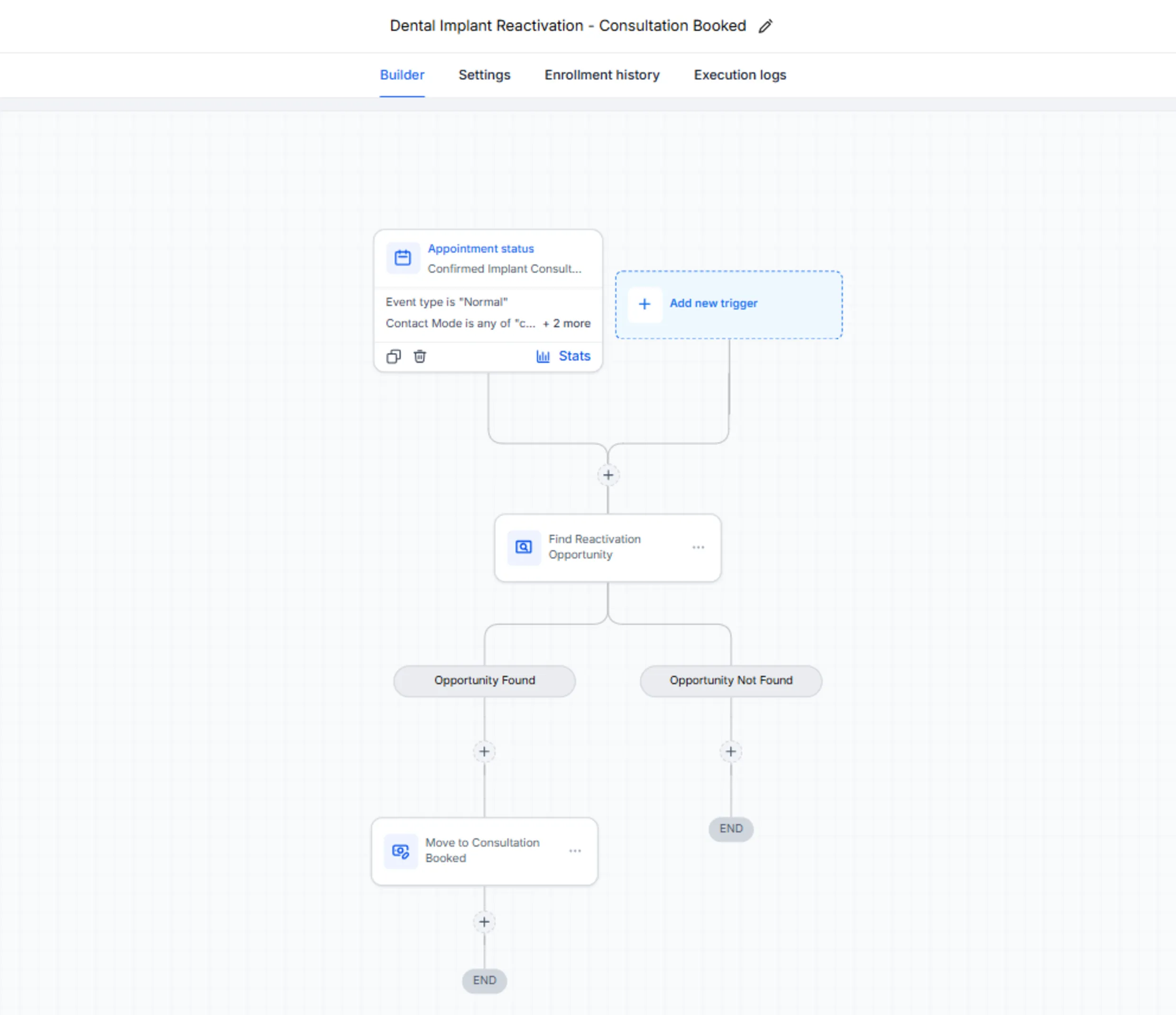
This native GHL workflow uses a confirmed calendar appointment—not AI intent—as the authoritative signal for moving the existing reactivation opportunity to Consultation Booked.
Workflow 1 — Outbound Reactivation
n8n workflow: Dental Implant Reactivation - Intake
Workflow 1 handles the outbound reactivation process.
When the implant-reactivation-ready tag is added in GHL, a native GHL workflow sends the contact to n8n through a production webhook.
The workflow then:
- Retrieves the latest GHL contact state, including DND.
- Normalizes contact and historical lead data.
- Runs deterministic eligibility checks.
- Stops DND, missing-email, already-booked, and converted contacts.
- Assigns a deterministic reactivation segment.
- Assigns a deterministic priority.
- Uses OpenAI only to generate the email subject and body.
- Requires structured model output.
- Validates the generated email against dental safety guardrails.
- Sends the approved email through Gmail.
- Stores the exact sent email in GHL for later reply context.
- Finds the lead's reactivation opportunity.
- Updates an existing opportunity or creates one in
Contacted. - Removes the
implant-reactivation-readytrigger tag.
The reactivation segments are deliberately small and deterministic:
PRICE_OBJECTIONNO_RESPONSENO_SHOWTIMINGCOMPARING_CLINICSUNKNOWN
Priority is also deterministic:
HIGHMEDIUMLOW
AI is not responsible for eligibility, segmentation, priority, CRM routing, or sending decisions.
AI generates language. n8n controls the business process.
The email safety layer blocks unsupported claims involving pricing, financing, availability, guarantees, treatment eligibility, clinical advice, and other clinic-specific facts that were not provided.
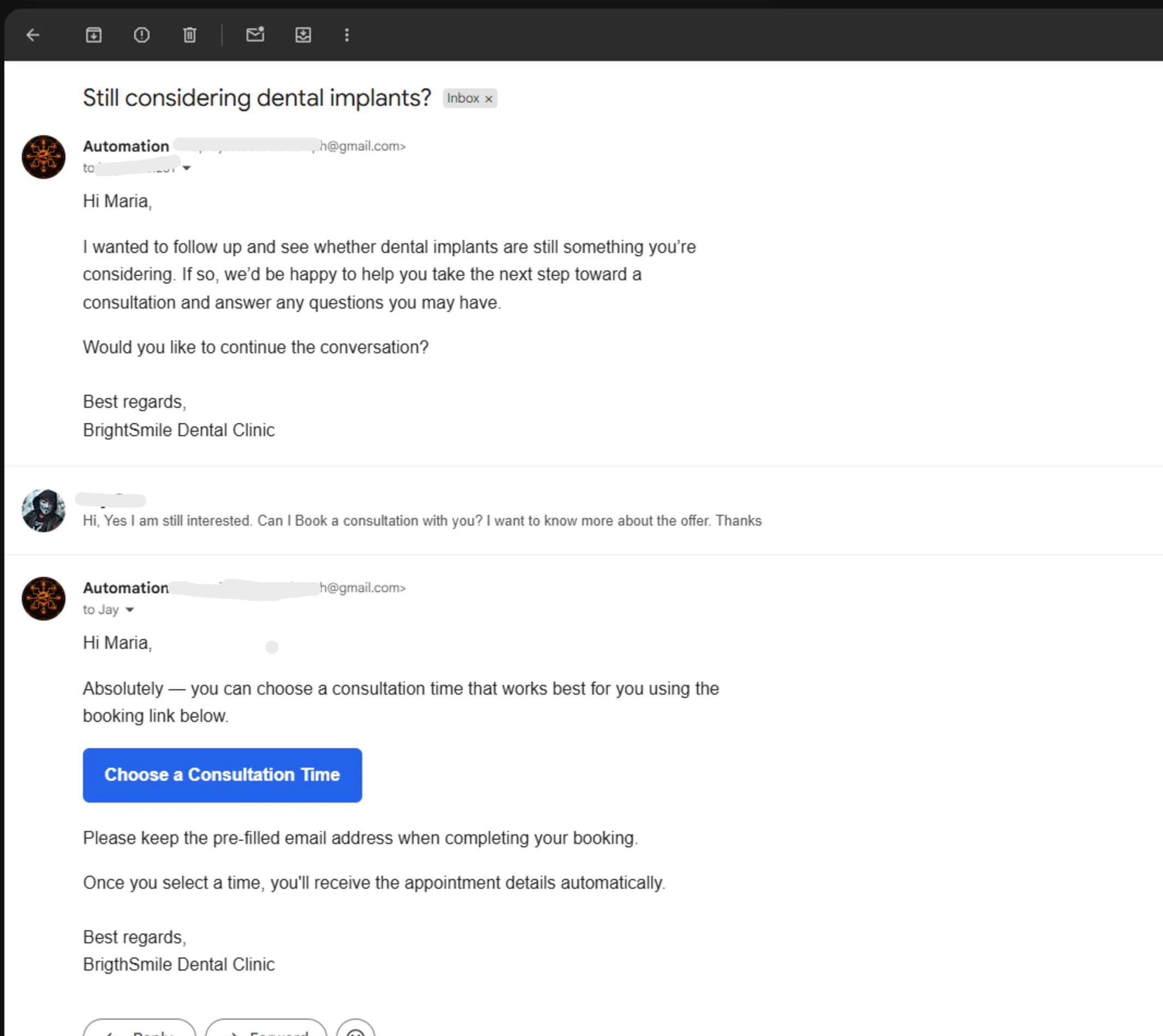
This controlled test email shows the final customer-facing output after personalization and safety validation. The copy remains short, low-pressure, and limited to approved lead context.
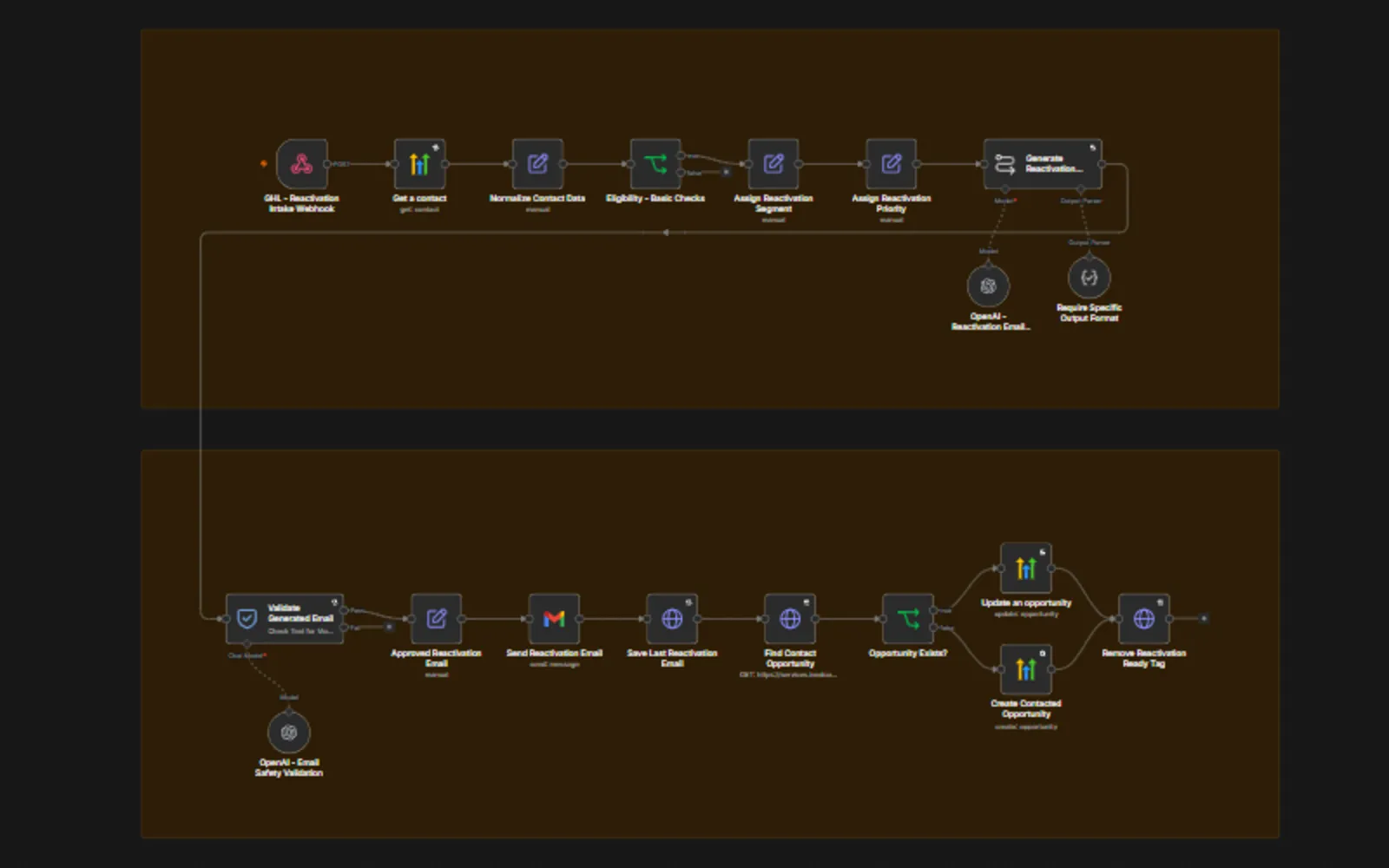
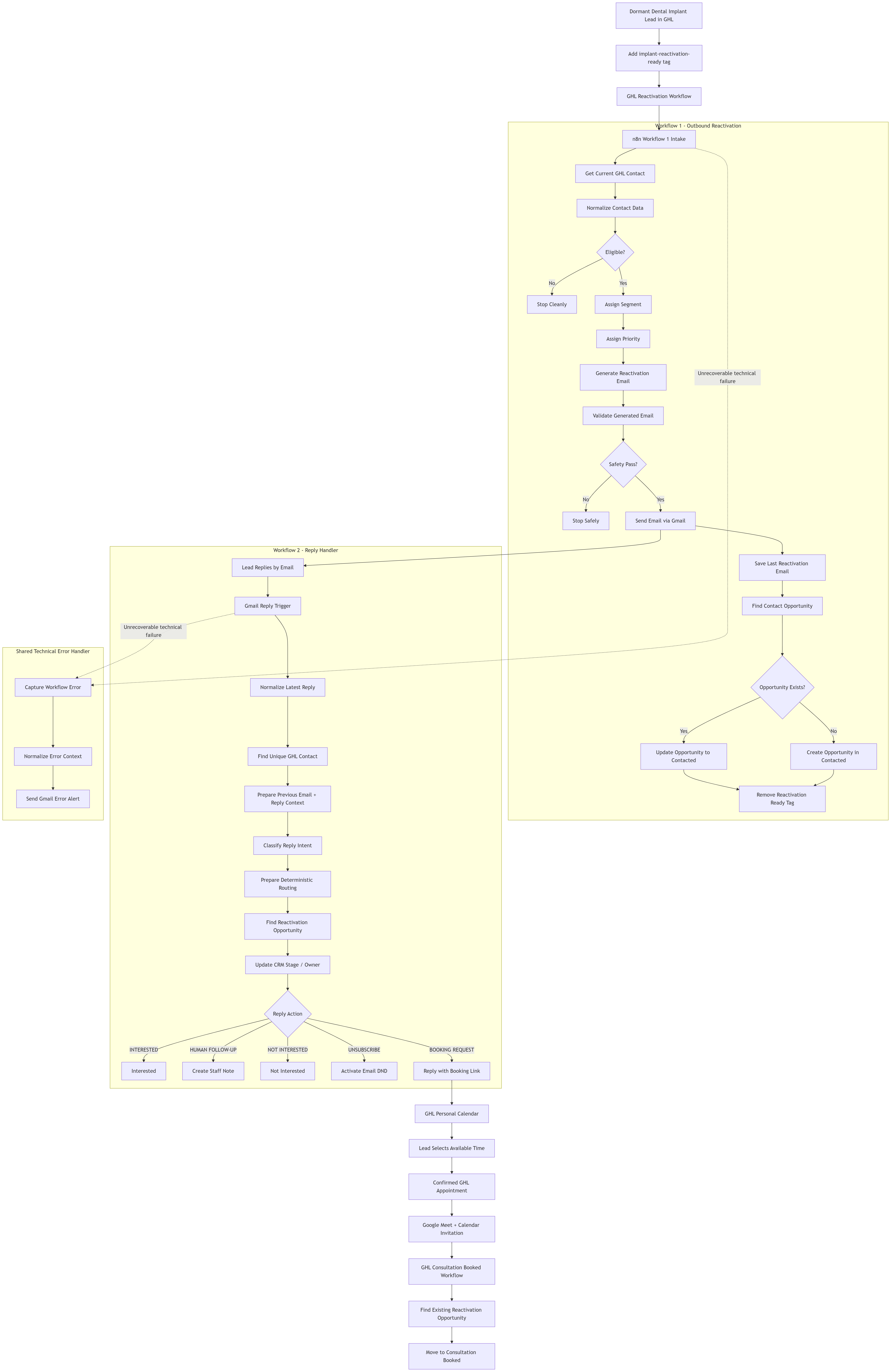
The outbound n8n workflow handles intake, eligibility, deterministic segmentation and priority, controlled AI generation, safety validation, Gmail delivery, and GHL opportunity writeback in one production flow.
Workflow 2 — Reply Classification & Routing
n8n workflow: Dental Implant Reactivation - Reply Handler
Workflow 2 is a separate event-driven workflow that begins when the lead replies to the Gmail message.
The outbound workflow does not remain open waiting for a response.
The reply workflow:
- Detects the new Gmail reply.
- Extracts the sender, message ID, thread ID, subject, and latest reply text.
- Removes quoted email history so the classifier sees the newest response.
- Matches the sender to exactly one GHL contact.
- Retrieves the previous reactivation email stored in GHL.
- Combines the previous clinic email with the newest customer reply.
- Uses OpenAI to classify the reply into one controlled intent.
- Converts that classification into deterministic CRM actions.
The classifier supports eight intents:
INTERESTEDBOOKING_REQUESTQUESTIONNOT_INTERESTEDUNSUBSCRIBEHUMAN_REQUESTEDCLINICAL_QUESTIONUNKNOWN
The model only classifies language. n8n decides what happens next.
Routing
| Intent | CRM Result | Additional Action |
|---|---|---|
INTERESTED | Interested | None |
BOOKING_REQUEST | Human Follow-up | Send booking link |
QUESTION | Human Follow-up | Assign staff + create note |
HUMAN_REQUESTED | Human Follow-up | Assign staff + create note |
CLINICAL_QUESTION | Human Follow-up | Assign staff + create note |
UNKNOWN | Human Follow-up | Assign staff + create note |
NOT_INTERESTED | Not Interested | None |
UNSUBSCRIBE | Not Interested | Activate Email DND |
A BOOKING_REQUEST is intentionally not treated as a completed appointment.
For booking intent, the workflow:
- Moves the opportunity to
Human Follow-up. - Assigns the Treatment Coordinator.
- Replies in the existing Gmail thread with a deterministic booking link.
- Prefills first name, last name, and email on the GHL booking page.
- Lets the lead select a real available consultation time.
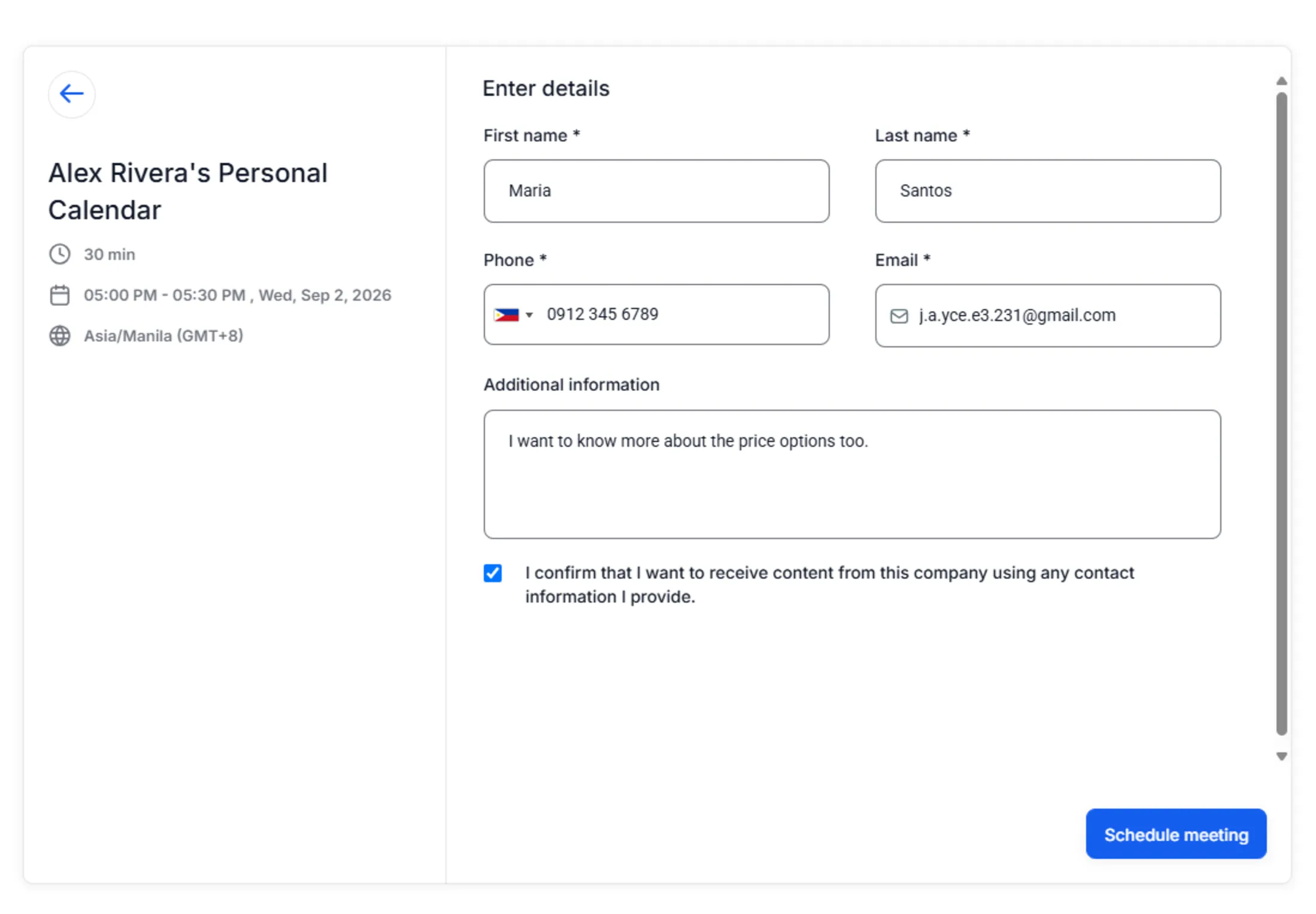
The GHL booking page presents real calendar availability and pre-fills the lead's first name, last name, and email to reduce booking friction.
After the lead books, GHL creates the appointment, generates the Google Meet link, sends the calendar invitation, and runs a native appointment workflow that moves the existing reactivation opportunity to Consultation Booked.
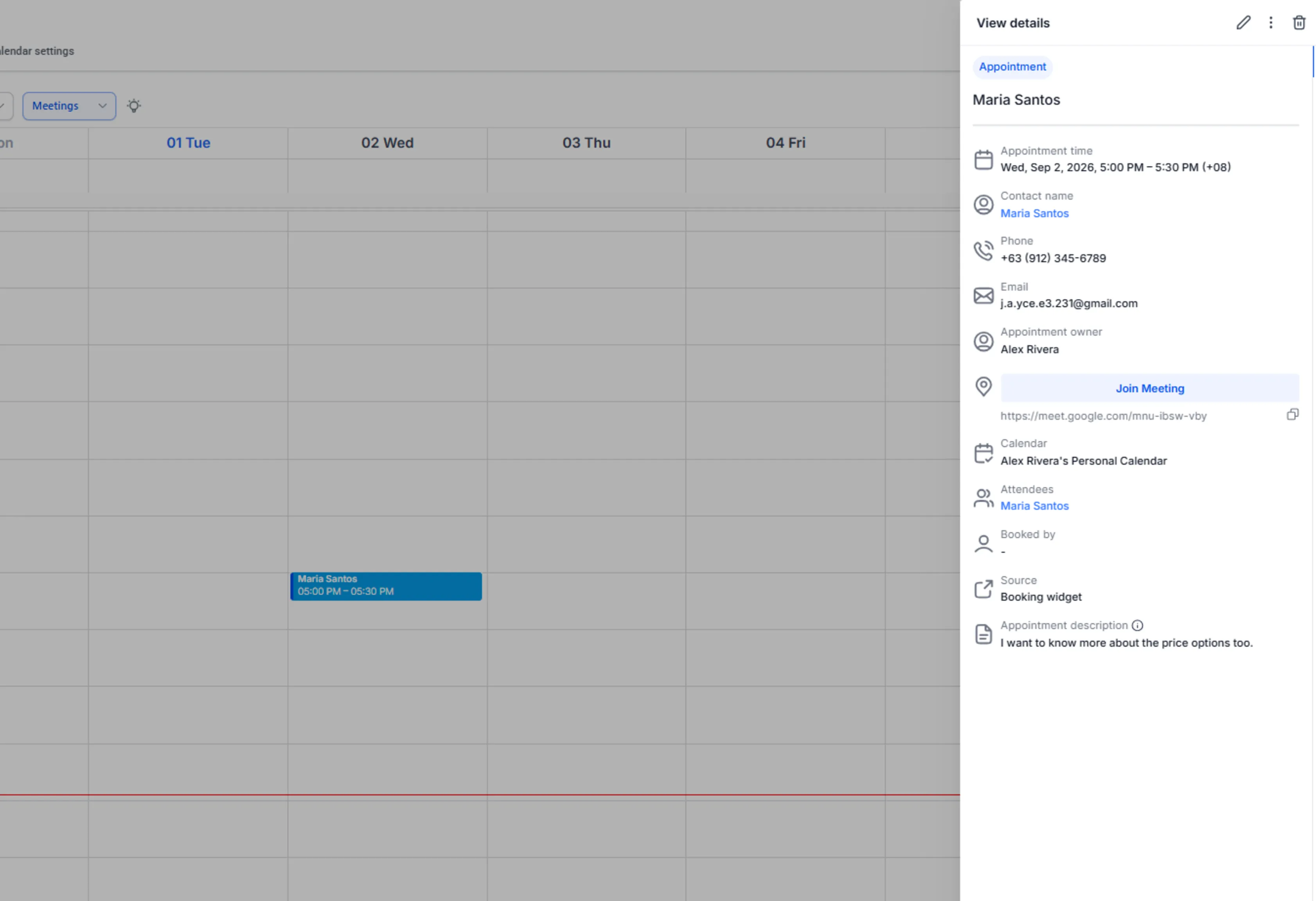
The confirmed appointment is the proof of booking completion: the calendar event exists, the meeting is scheduled, and the CRM can safely advance to Consultation Booked.
This keeps booking intent separate from verified booking state.
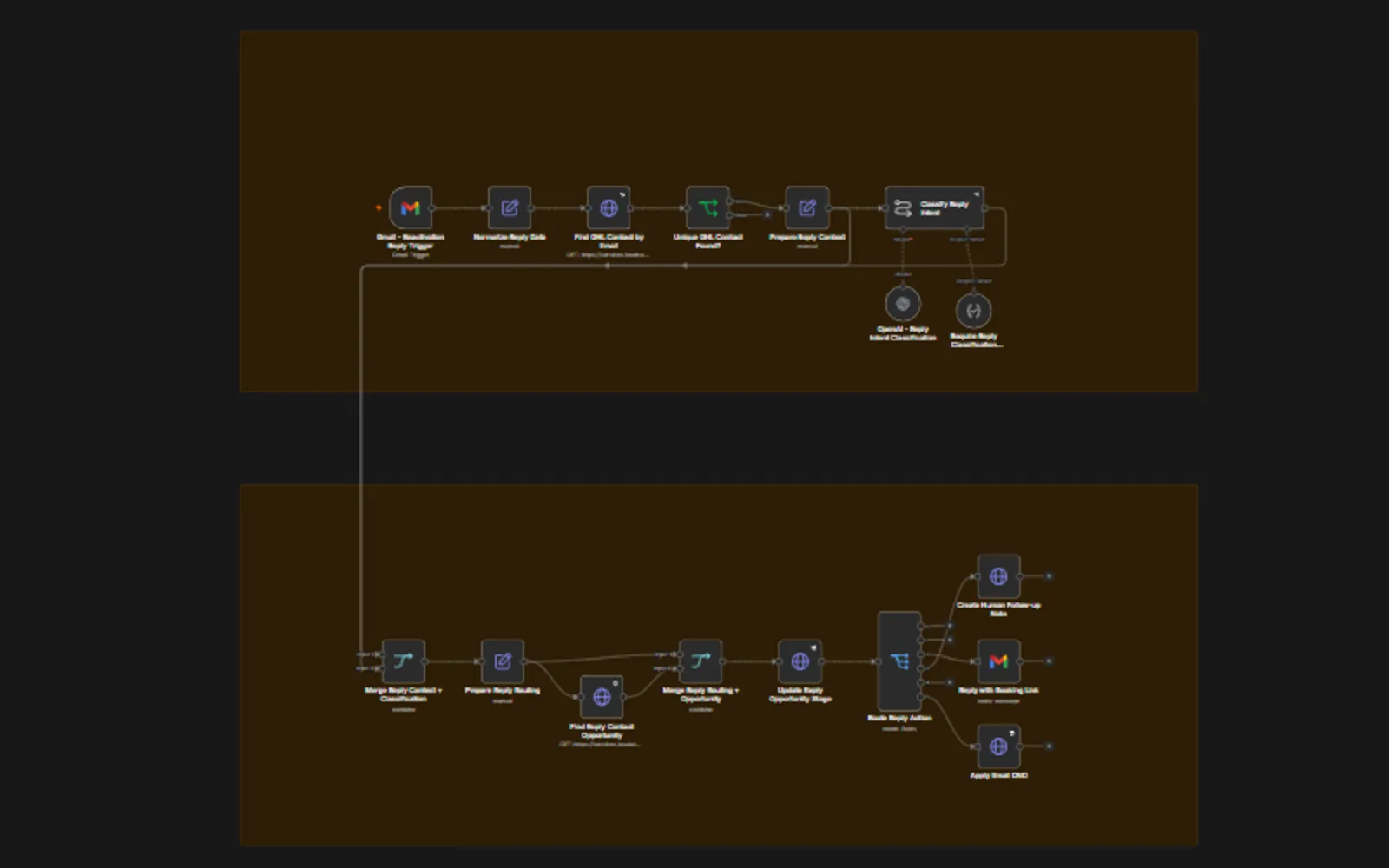
The inbound workflow maps Gmail replies back to the correct GHL contact, classifies the latest reply, and converts the AI intent into deterministic CRM and follow-up actions.
Workflow 3 — Shared Error Handling
n8n workflow: Dental Implant Reactivation Error Handler
A single shared technical-error workflow handles failures from both production n8n workflows.
The error handler contains three core steps:
- Capture Workflow Error — receives n8n failed-execution metadata.
- Normalize Error Context — extracts the workflow, execution, failed node, error message, trigger, and execution link.
- Send Workflow Error Alert — sends a technical Gmail alert with enough information to inspect the failed execution.
Expected business outcomes are not treated as technical errors.
Examples that remain inside the normal workflow:
- Eligibility failure
- Guardrail rejection
- Not interested
- Unsubscribe
- Clinical question
- Unknown intent
- Human Follow-up
Selective Retry Strategy
Retries are enabled only when the operation is safe to repeat.
Safe examples include:
- Read-only API lookups
- Repeat-safe CRM state updates
- AI operations before customer-facing side effects
- Email DND activation
Blind retries are disabled for operations that could create duplicate side effects:
- Sending the reactivation email
- Sending the booking-link reply
- Creating a new opportunity
- Creating a Human Follow-up note
If one of those operations succeeds externally but n8n receives an ambiguous failure, automatically repeating it could send duplicate customer messages or create duplicate CRM records.
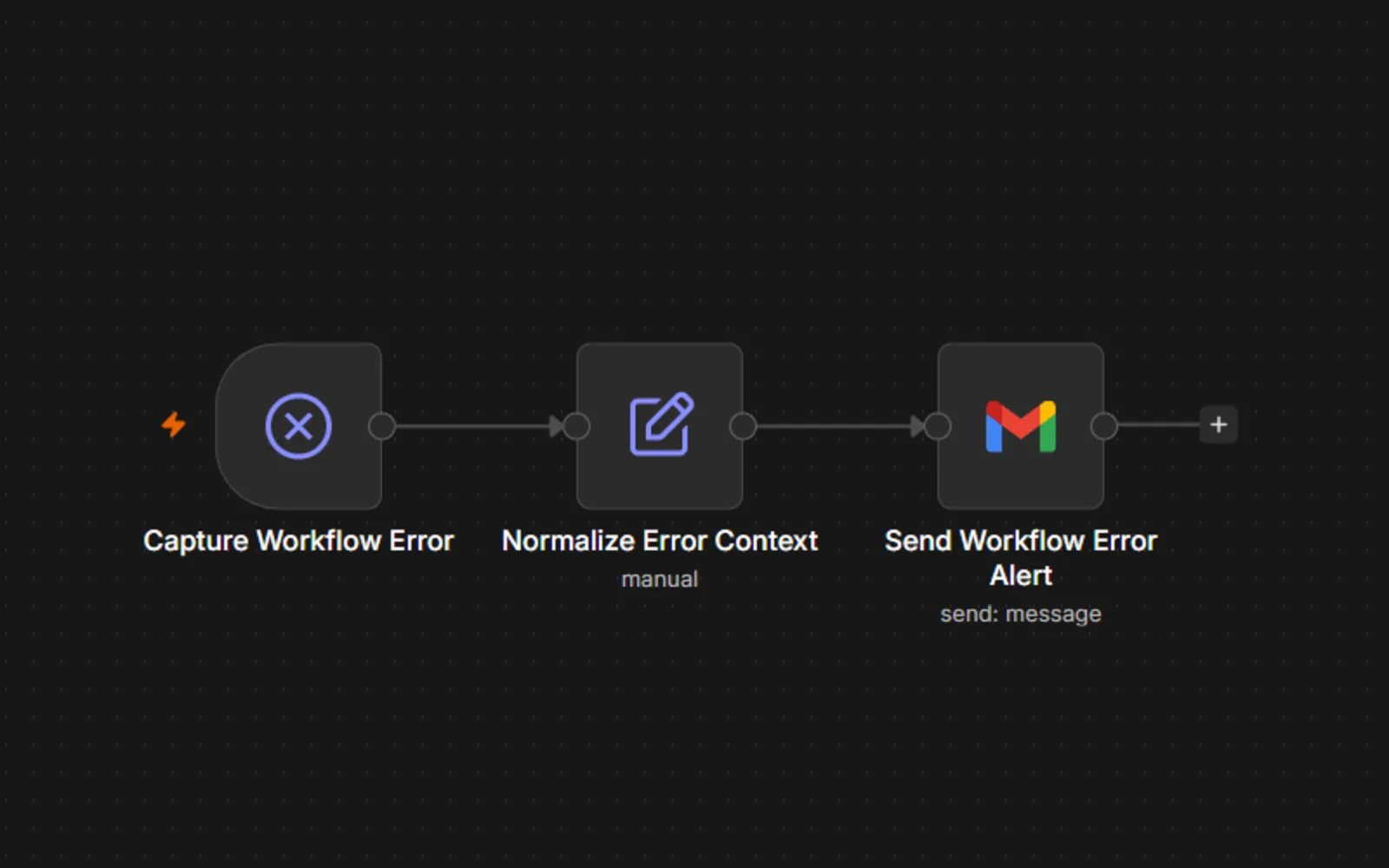
Both production n8n workflows send unrecoverable technical failures into this shared handler, which captures and normalizes the execution context before alerting the operator.
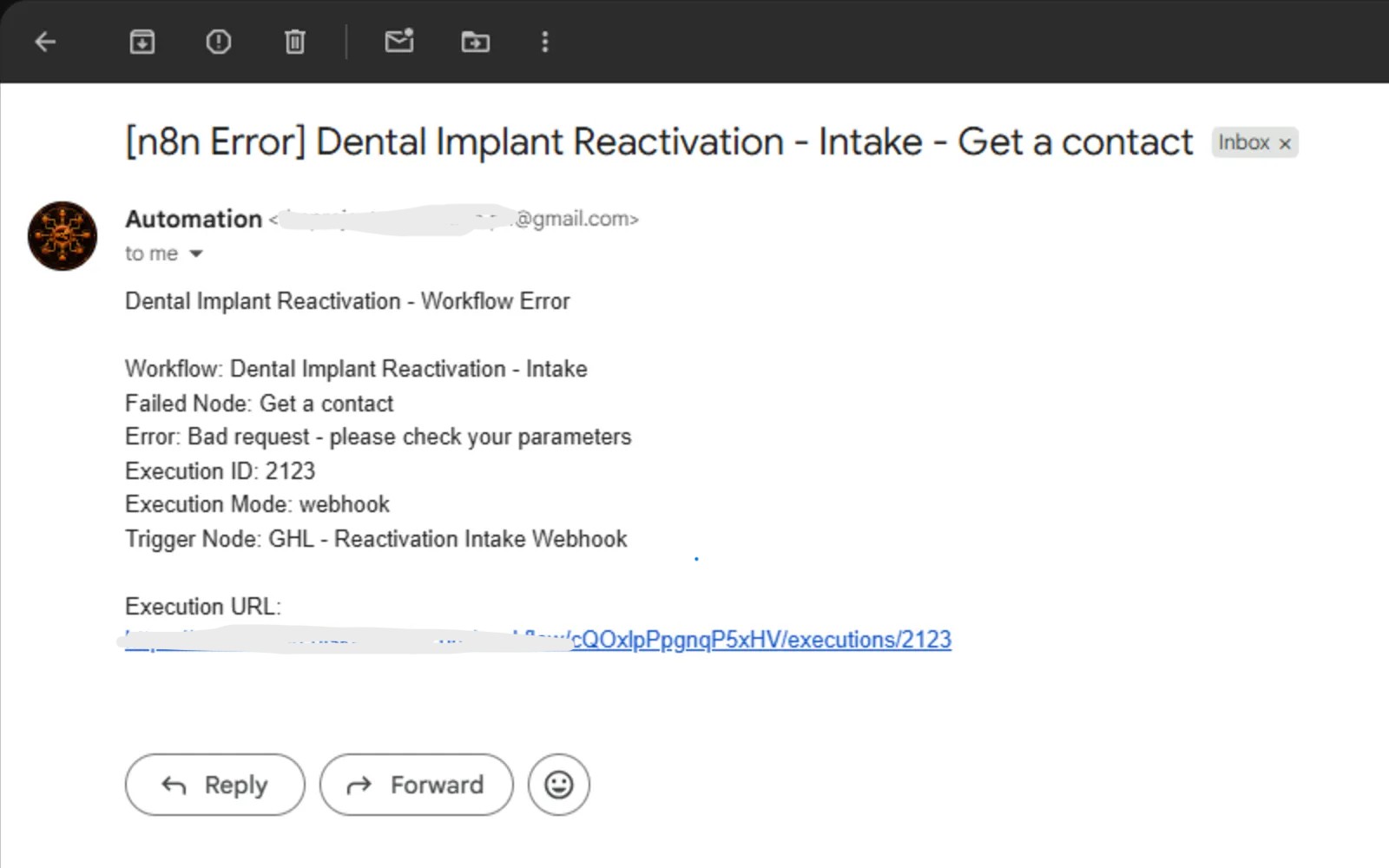
The technical alert identifies the failed workflow and node, includes the error context and execution ID, and provides a direct path back to the failed n8n execution for investigation.
Solution & Outcome
The finished MVP connects CRM reactivation, controlled AI, human escalation, appointment booking, and production-style failure handling into one system.
A complete controlled test validated this lifecycle:
Reactivation Ready
→ eligibility validation
→ deterministic segmentation
→ deterministic priority
→ AI-generated reactivation email
→ safety validation
→ Gmail delivery
→ Contacted
→ customer reply
→ AI intent classification
→ deterministic routing
→ booking request
→ Human Follow-up
→ self-service booking link
→ confirmed GHL appointment
→ Google Meet creation
→ calendar invitation
→ Consultation Booked
The project also validated:
- Email DND contacts are blocked before outreach.
- Missing-email contacts are blocked.
- Already-booked and converted contacts are blocked.
- Unsafe generated email claims fail validation.
- Existing opportunities are updated instead of duplicated.
- Missing opportunities are created only when required.
- Clinical and uncertain replies are escalated to a human.
- Unsubscribe requests activate native GHL Email DND.
- Booking intent does not become
Consultation Bookeduntil a real appointment exists. - Safe transient failures use limited retry.
- Ambiguous side-effect operations avoid blind retries.
- Both production workflows report unrecoverable technical failures through one shared error workflow.
Business Outcome
The system turns a dormant CRM database into an actionable reactivation process.
Instead of staff manually reviewing old records, writing every follow-up, interpreting every reply, updating opportunity stages, and coordinating each booking, the workflow automates repeatable work while preserving human involvement where judgment is required.
This is especially useful for businesses where lead acquisition is expensive and the sales cycle is long enough that prospects frequently delay instead of converting immediately.
Validation Scope
This is a portfolio MVP validated with controlled test contacts and inboxes.
The project does not claim a measured increase in clinic revenue, conversion rate, or appointments because it has not been deployed against real patient leads for business-performance measurement.
The verified outcome is the working end-to-end automation architecture and its tested business rules.
Technology Stack
| Technology | Role |
|---|---|
| GoHighLevel | CRM, contacts, pipeline, opportunities, custom fields, Email DND, staff ownership, workflows, calendar, and booking state. |
| n8n — Self-Hosted | Main orchestration layer for eligibility, segmentation, priority, routing, CRM updates, AI execution, and error handling. |
| OpenAI | Controlled email generation, reply-intent classification, and email safety validation. |
| Gmail | Sends reactivation emails, receives lead replies, sends booking-link replies, and delivers technical error alerts. |
| HighLevel API / OAuth | Authenticated CRM reads and updates between n8n and GoHighLevel. |
| Google Calendar | Synchronizes real calendar availability and confirmed consultations. |
| Google Meet | Generates the virtual consultation meeting for confirmed appointments. |
Workflow Diagram