Status: Design complete, build-ready — full implementation plan, architecture, data model, and working code (JavaScript for Code by Zapier). Airtable base and Slack app registration pending deployment.
Context
A local hardware store managing <500 SKUs relied on manual stock checks. Staff walked the floor daily, checked bins, and emailed suppliers one-by-one when something ran low — error-prone, time-consuming, often delayed restocks.
Problem
- Missed reorder triggers until items were completely out of stock
- Inconsistent supplier communication (no standardized reorder template)
- No audit trail of alerts or actions taken
- No lightweight approval mechanism before sending purchase orders
Solution
Automated no-code/low-code system on Airtable + Zapier (~$20/mo operating cost):
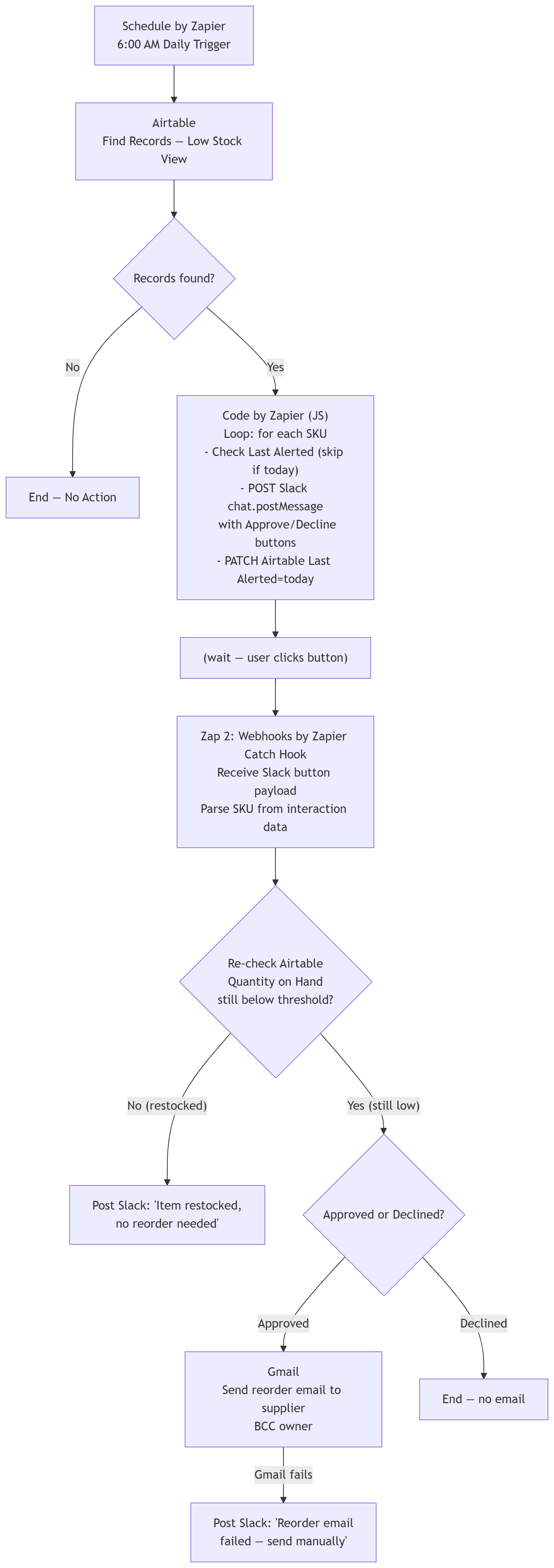
Daily Detection: Scheduled Zap reads a filtered Airtable view of low-stock SKUs every morning at 6 AM.
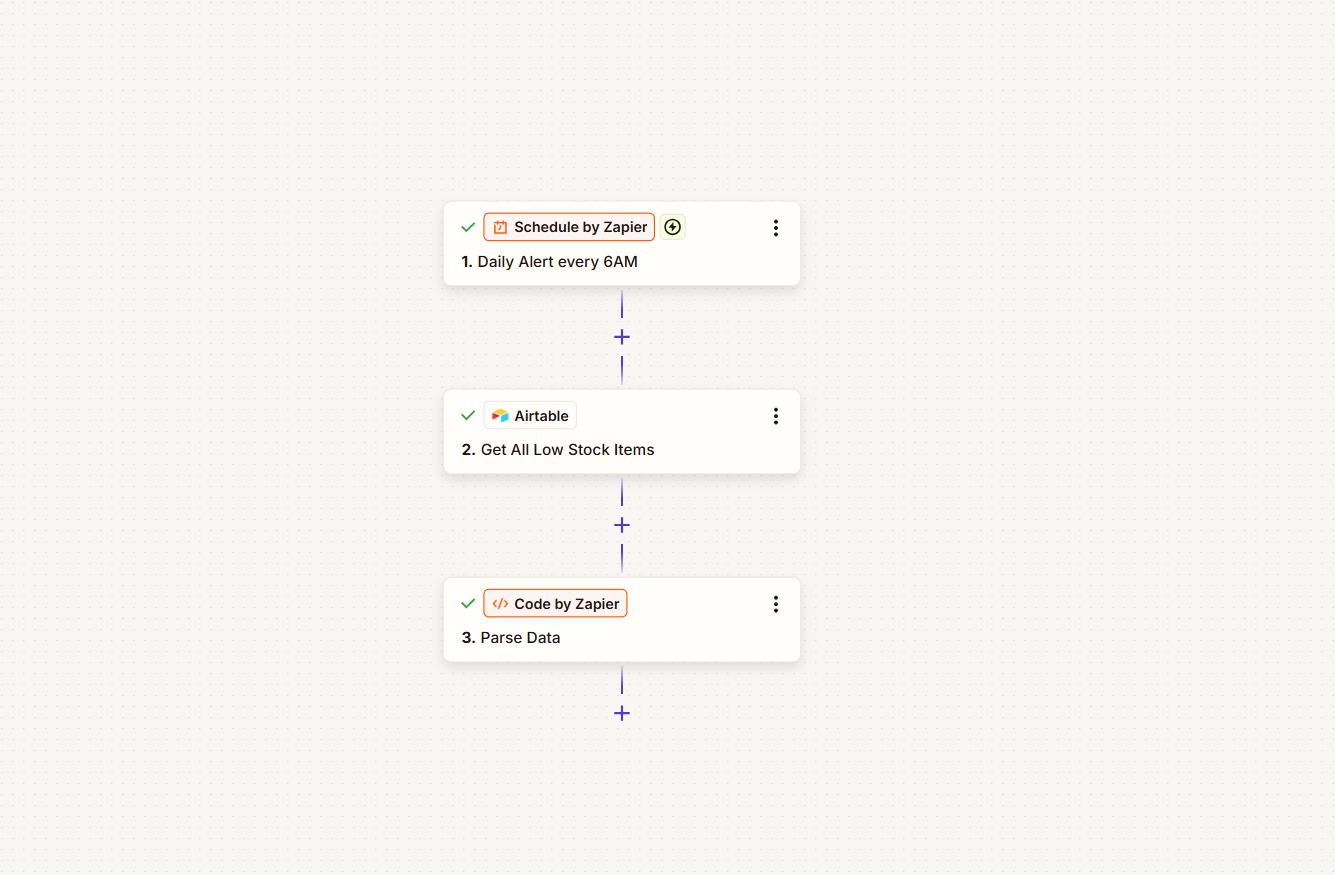
Slack Alerts: Code by Zapier (JavaScript) loop sends per-SKU Slack messages with Approve/Decline interactive buttons, skipping items already alerted that day.
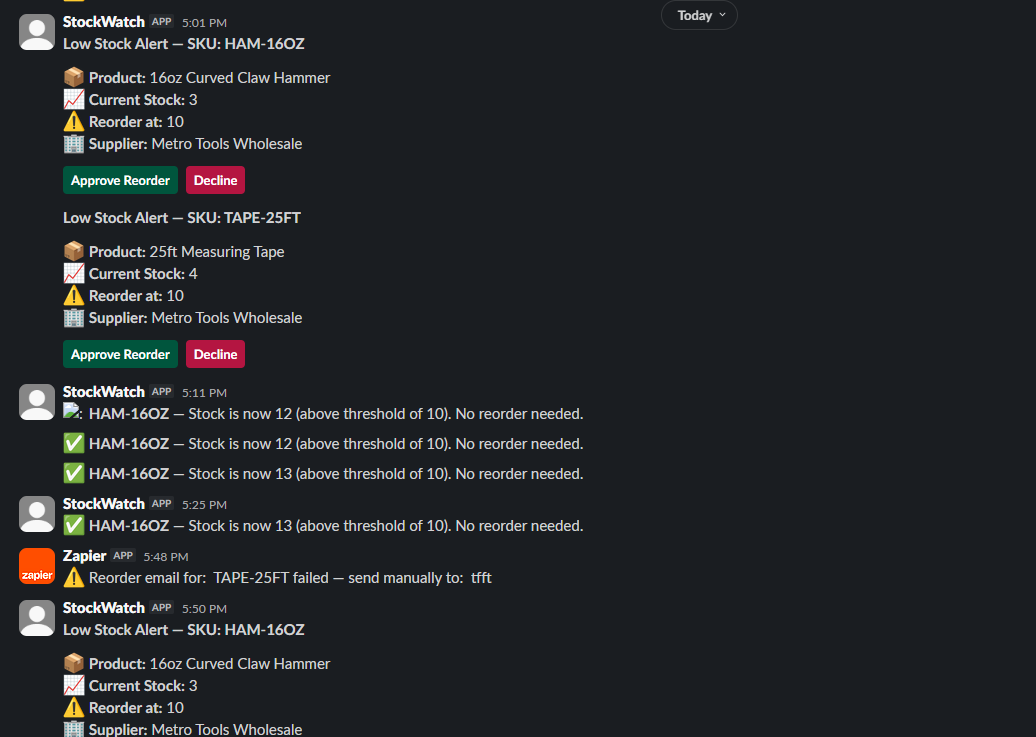
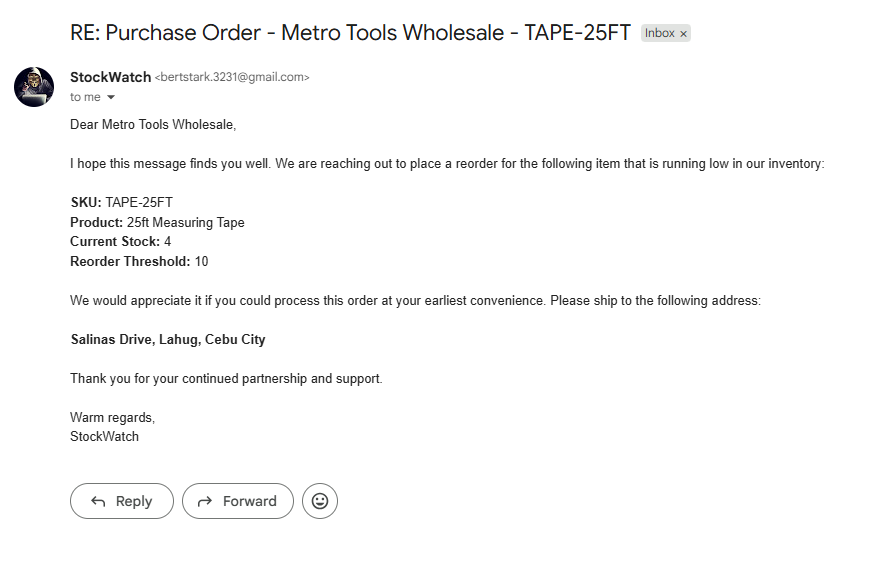
Approval Flow: On button click, a second Zap re-checks current stock in real-time. If still low and approved, it sends a standardized reorder email to the supplier (with owner BCC). If restocked, it posts a status update — no email sent.
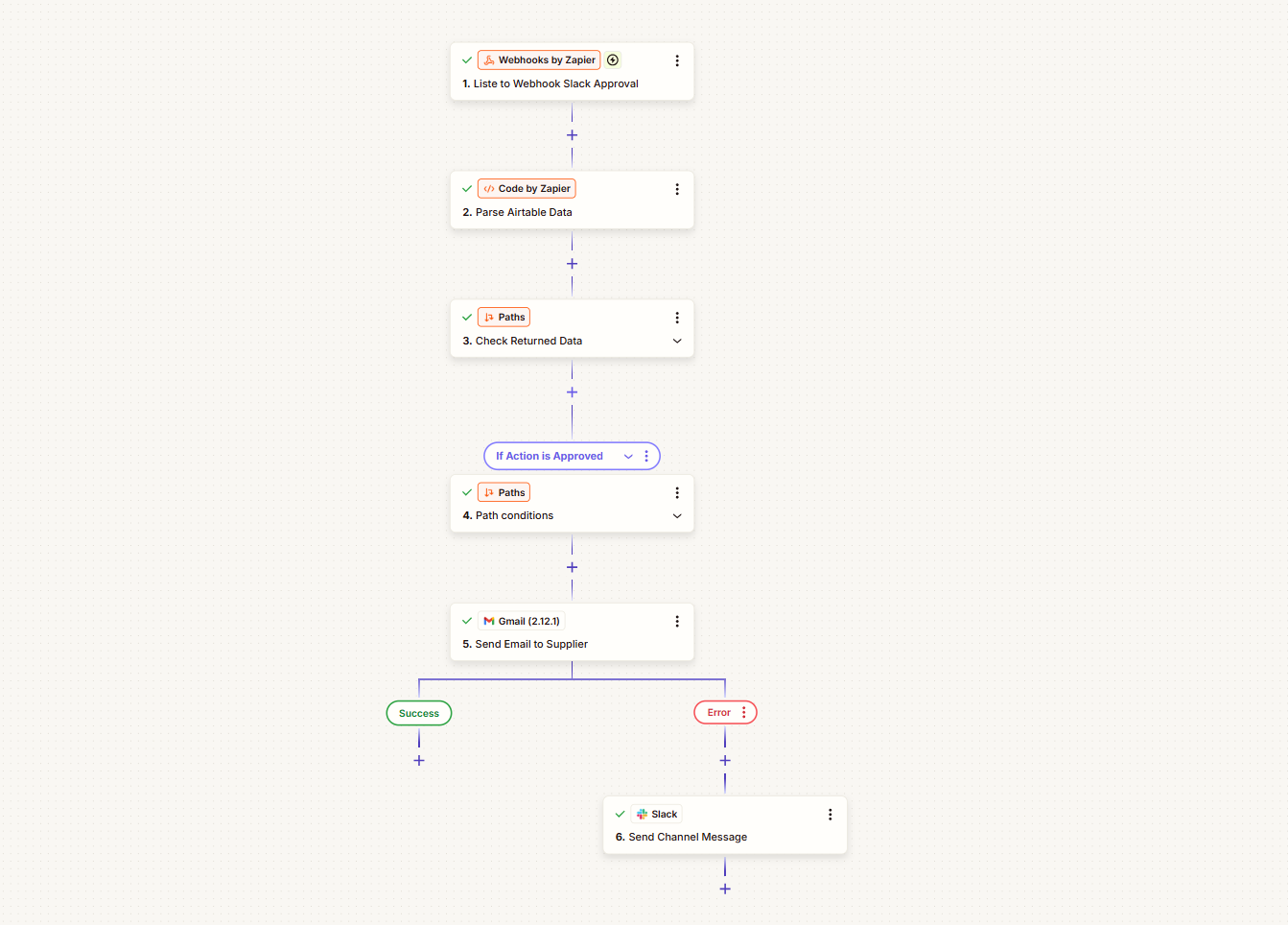
Failure Handling: Gmail failures post an error to Slack. Missing supplier emails are flagged inline. Each SKU re-prompts daily until restocked.
Architecture
Data Model
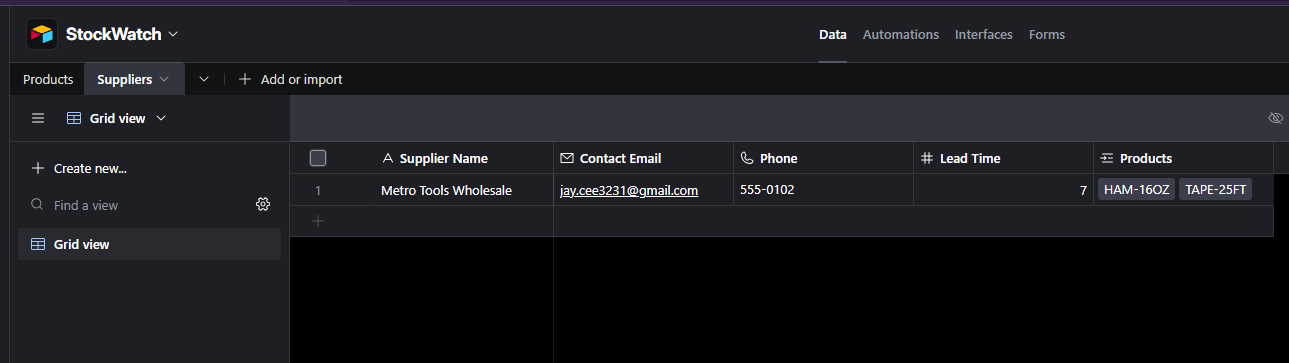
Two linked Airtable tables form the data layer:
Products — each row is a SKU with Quantity on Hand, Reorder Threshold, linked Supplier, and a formula calculating Status ("Low Stock" if quantity ≤ threshold). A Last Alerted date field prevents duplicate daily alerts.

Suppliers — vendor records with Contact Email and Lead Time, linked to Products via Airtable's Link to Record field. A single supplier can serve multiple SKUs.
A filtered Low Stock View on Products (Status = "Low Stock") is what Zapier reads during the daily check — only items needing attention are visible, keeping the automation layer simple.

Key Design Decisions
- Code by Zapier for per-SKU looping — JavaScript loop over Airtable results calls Slack's API directly, keeping operating cost at ~$20/month
- Per-SKU approval granularity — owner decides per item, not batched
- Real-time stock re-check on approval — prevents stale purchase orders if stock was restored between alert and button click
- Airtable over Google Sheets — Airtable's record-based triggers avoid a known Zapier+Sheets bug where a recurring cell value (e.g., stock dropping to the same low number after restock) fails to re-trigger. Also provides linked records, formula fields, and filtered views out of the box.
- Last Alerted date field — simple duplicate prevention that survives resets
- Filtered Airtable View — Zapier reads only items where
Status = "Low Stock", avoiding comparison logic in the automation layer - Interim threshold strategy — Reorder thresholds start as estimates (~2 weeks of usage) and evolve to a data-driven formula (
Average Daily Sales × Lead Time + Safety Stock) as sales history accumulates, keeping the system pragmatic from day one
Tech Stack
| Tool | Role |
|---|---|
| Airtable | Central database — stores Products and Suppliers tables with linked records, formula-based status computation, and filtered views for Zapier consumption |
| Zapier Professional | Orchestration engine — schedules the daily run, connects Airtable → Slack → Gmail via multi-step Zaps with conditional paths |
| Slack | Alert channel & approval interface — posts low-stock notifications with interactive buttons; receives owner decisions via Slack's interactivity webhook |
| Gmail | Reorder dispatch — sends standardized purchase order emails to suppliers on approval, with owner BCC |
| JavaScript (Code by Zapier) | Custom logic layer — iterates low-stock records, calls Slack/Airtable APIs directly, handles error branches and daily deduplication |
Impact
- Eliminates daily manual stock checks
- Standardizes supplier communication with auto-generated reorder emails
- ~$20/month all-in operating cost (Zapier Professional only; Airtable on Free tier)
- Full audit trail: Slack history + Airtable timestamps
- Architecture scales: threshold formulas can evolve from estimates to data-driven reorder points as sales history accumulates
Lessons Learned
- Cost-driven architecture pays off — A JavaScript loop in Code by Zapier replaced the need for a more expensive plan tier, keeping monthly costs at ~$20. The trade-off is a small maintenance surface area, but for a <500-SKU store the custom code is simpler and cheaper than infrastructure overhead.
- No-code tools still need good system design — Zapier handles orchestration, but the data model (SKU as root entity, linked Suppliers, formula-based Status) and error handling (Gmail failure → Slack fallback, missing email detection) required the same architectural thinking as a custom-built system.
- Design for the real state, not the ideal state — Thresholds start as estimates because sales velocity data doesn't exist yet. The system is built to evolve: once history accumulates, thresholds switch to a formula without changing the automation flow.